
Over many years of experience I had in Dynamics platform I am familiar with Microsoft’s continous and frequent updates on user interface and user experience. Although the main focus has always been to keep the platform up to date with trends of technology, I should be honest to admit that it was always challenging to maintain user adoption and technical alignment on complex enterprise solutions/workflows.
With the release of the 2023 Wave 1 update, Microsoft has introduced a new look and feel for model-driven apps. This new look comes with updated user experience on 3 main pillars; new styling on forms and views, new “Fluent-based controls”, and new Power Apps grid. In this blog post, we will discuss those new changes and what they mean for Dynamics 365 users as well as how to configure and control them in your environments.
New styling on forms and views
New command bar experience provides more consistent and familiar look and feel as in other Microsoft apps. Elevated separate section makes it more visible on top of the forms and view as a container of available actions for the context.
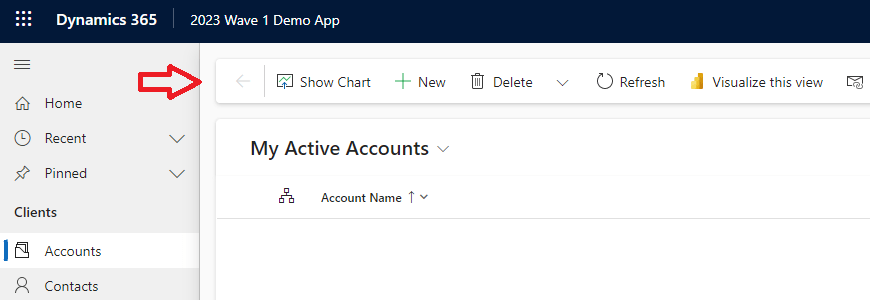
Form page with new look also follows the same experience to have elevated section containers with rounded rectangles.
Header section is pinned on top of the form as a frozen pane. This is one of the key improvements that users have been asking for a while. Especially for the forms which contain a business process flow along with multiple sections of controls to scroll to the bottom, it would provide more efficient and productive experience for naviagation within the form.
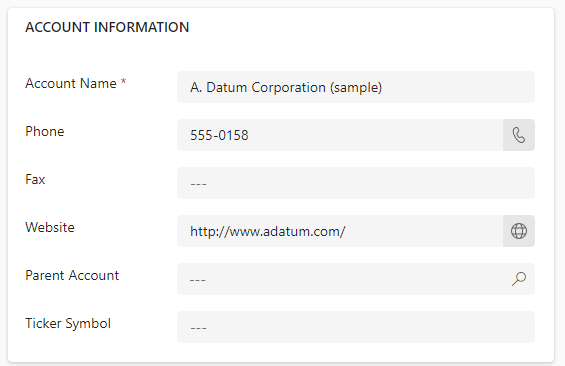
Here is an example of how an account form appears in new look

Fluent based controls
The big step forward in this update is introduction of Fluent based controls on forms. While providing a consistent and standard user experience, this strategic technical change indicates a direction on what future enhancements we can expect on form controls.
Text input, action input, lookup, and check box controls are already moved to Fluent components and more to follow in upcoming updates. Considering the same control framework is becoming the new standard on Power Apps, Canvas Apps etc. it is important to get familiar with Fluent UI for a developer/designer.
New Power Apps grid control
Besides all valuable information about Power Apps grid control, the key statement to take away from Microsoft release documentation for 2023 Wave 1 update is “This control will eventually replace all read-only and editable grids in model-driven apps”.
Although Microsoft has left it for makers/administrators to decide and control enabling Power Apps grid control as of now, I would strongly recommend to adapt this grid control into your model-driven apps as early as possible.
Key highlights/features of the control;
- ➕ infinite scrolling for a modern data browsing experience
- ➕ supported in sub-grids and associated grids in main forms
- ➕ supports inline editing
- ➖ not yet supported in dashboards
Key notes
- The new look is only supported for Web interface to start with and is not available and not supported on mobile or outlook apps yet.
- Updates come toggled off by default but can be enabled for any model driven app by app makers or administrators.
Conclusion
The new look and feel of model-driven apps on Dynamics 365 introduced in the 2023 Wave 1 update provides users with yet another noticably different experience. The enhanced look, increased customization options, and improved performance will make it easier for users to interact with the system and complete tasks more efficiently.
The new update is a significant step forward to align the platform with other apps via leveraging Fluent control framework and experience. It will be exciting to see how the adoption and reaction will be from the businesses and what future technical enhancements and flexibilities will Fluent controls offer.

 kursat topcu