
Introduction
Diving into the Dynamics 365 model-driven apps and Microsoft’s blending AI into Power Platform, the preview of the Copilot feature is catching the eye. The introduction of Copilot into model-driven apps infuses conversational AI directly into the core of app navigation and data management, significantly enhancing the intuitiveness of daily operations. This exciting feature has been eagerly anticipated, promising to transform the user experience by seamlessly integrating AI assistance at the heart of our core CRM solutions. Here’s a closer look at how this feature can be a significant advantage in your workflow.
What is Copilot in Model-Driven Apps?
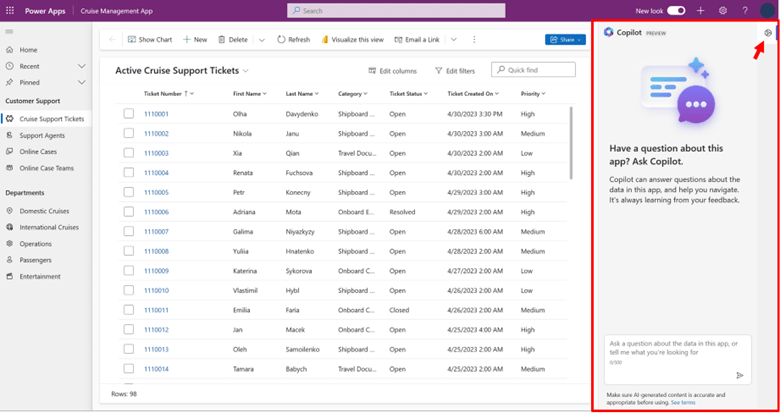
Copilot in model-driven apps is Microsoft’s latest step in blending AI with everyday business processes. It’s designed to assist users by offering insights and navigation through natural language queries, making it a potential advantage for productivity.
- Capabilities: Copilot answers queries about specific data tables, guiding users with actionable insights and facilitating smoother workflows. For instance, it can provide summaries of sales data or update records without manual input.
- Intended Use: It serves as an AI assistant, providing quick answers to your data-related questions and guiding you through the app’s functionalities without you needing to click through multiple screens.
Setting Up Copilot in Your Dynamics 365 Environment
Getting Copilot up and running involves a few key steps but promises a significant boost to how you interact with your Dynamics 365 environment.
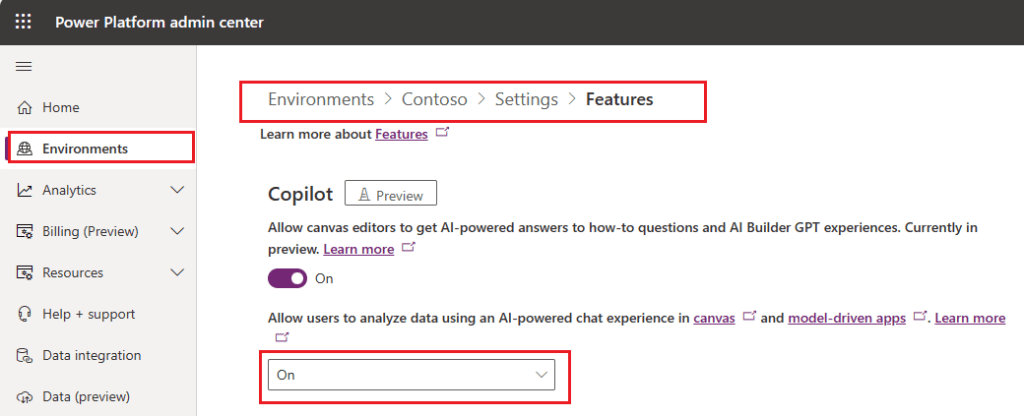
- Enable Copilot Feature:
- Navigate to the Power Platform admin center and toggle on the Copilot feature under the ‘Product > Features’ menu.
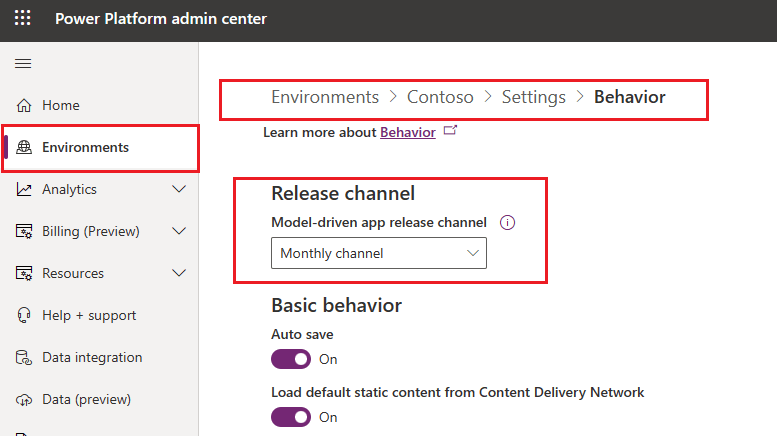
- Configuring Your Environment:
- Ensure your system is set to receive the latest updates by selecting the Monthly update channel in your environment settings. This keeps your system in sync with the newest features and improvements.
Leveraging Copilot Effectively
To get the most out of Copilot, here are some practical tips:
- Optimize Your Queries: Use simple, direct questions to get the best responses. For example, instead of asking, “How many?”, specify what you want to know, like, “How many new support tickets were opened today?”
- Navigate Efficiently: Directly command Copilot to navigate to specific pages within the app, such as, “Take me to the customer feedback form.”
Feedback and Enhancements
Your feedback is crucial for improving Copilot during its preview phase:
- Providing Feedback: Easily submit feedback through the Copilot interface in your app. This helps Microsoft refine the features according to user needs.
- Adapt Based on Feedback: Microsoft uses your input to continuously enhance Copilot, aiming to better align its functionality with real-world business requirements.
Limitations to Keep in Mind
While Copilot introduces a range of possibilities, there are a few limitations during this preview phase:
- Preview Nature: The feature is not finalized for production use and might have limited functionality.
- Geographical and Language Availability: Currently, it’s only available in the US region and requires the English language setting.
Conclusion
The Copilot feature in Dynamics 365 model-driven apps is paving the way for a more interactive and efficient approach to managing business applications. By integrating this AI-driven assistant into your daily routine, you can enhance how you interact with data, streamline operations, and perhaps most importantly, save time. As you explore this new tool, remember that your insights and usage will help shape its future development, making it even more tailored to meet complex business needs.
For more details on setting up and using Copilot in model-driven apps, check out the official Microsoft documentation:
 kursat topcu