
With the release of the 2023 wave 1 update, Dynamics 365 / Power Platform users will have access to a new feature that allows them to see which colleagues are viewing the same record as them.
This new feature is a significant addition, as it enables users to collaborate more effectively and streamline their workflows.
To use this new feature, users can simply navigate to the record they are working on and look for the section allocated in the top right corner of the screen.
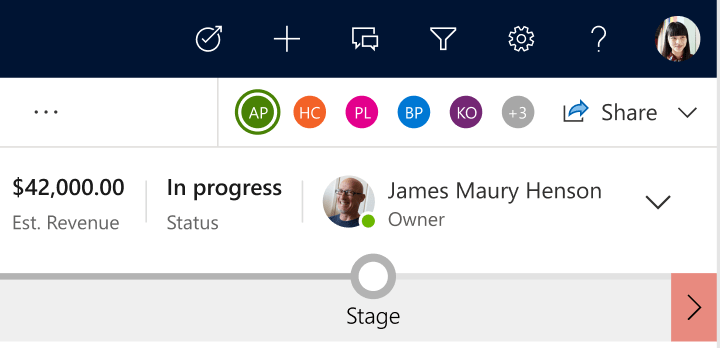
Here, you will see a list of all the colleagues who are currently viewing the same record as you. You can click on a colleague’s name to send them a message or start a chat with them.
Key benefits
- Improved Collaboration: With the ability to see which colleagues are viewing the same record as you, it becomes much easier to collaborate around contextual business data and processes. You can quickly identify who else is working on the same record, and you can reach out to them for collaboration. This feature has the potential to avoid boundaries and silos across different user groups working on the same record and it will encourage people to reach out to eachother for sharing more information.
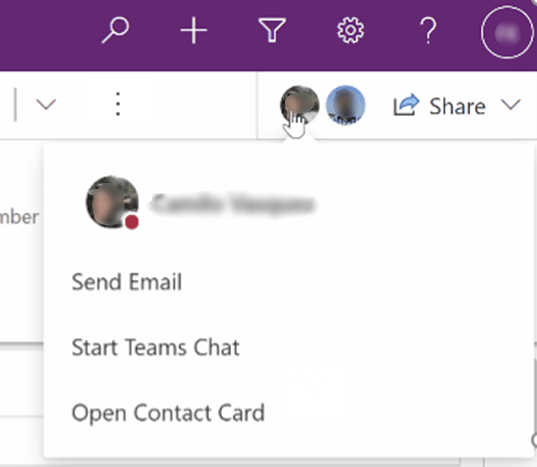
- Reduced Duplication of Effort: When multiple colleagues are working on the same record, there is a risk of duplication of effort. However, by viewing who else is working on the same record, you can avoid this problem. You can communicate with your colleagues and coordinate your efforts to ensure that you are all working together efficiently.
- Increased Productivity: When you know who else is working on a record, you can make more informed decisions about when to take action. For example, if you see that a colleague is already working on a record, you can hold off on making any changes until they are finished. This can help avoid conflicts and increase overall productivity.
Let’s consider an example use case;
- Assume you are a Salesperson preparing for your next client meeting to present your pitch for a cross-sell product for your client.
- While you are on the way to your client meeting, when you navigate to Client record in Dynamics 365 / Power Platform to review latest updates on opportunites and activites, you notice a Customer Service Representative is viewing the record at the same time.
- You can quickly initiate a teams chat with the person to check if there is any service related matters you should be aware of before meeting the client. Consider a scenario where a customer service case has been recently raised, and the client has a negative sentiment towards the product you plan to pitch for a cross-sell. This simple visibility and collaboration opportunity can provide you opportunity to re-plan your engagement in most efficient way to make your presentation/meeting a success.
Key technical/functional highlights
- You can benefit from this feature on all entities/tables including custom entities.
- You can enable/disable this feature on your environment as needed. There is a setting under Environments > Settings > Collaboration which can be controlled by administrators in Power Platform Admin Center. As per documentation from Microsoft for 2023 Wave 1 updates, this will be enabled by default as part of the release.
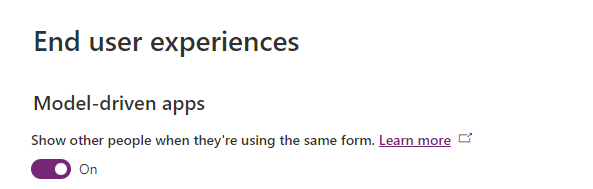
- This feature relies on Azure Fluid Relay Service (FRS) and you can check availability of the service on following link
- https://azure.microsoft.com/en-us/explore/global-infrastructure/products-by-region/?products=fluid-relay®ions=all
References:
https://learn.microsoft.com/en-us/power-apps/user/collaboration
 kursat topcu